> ## Documentation Index
> Fetch the complete documentation index at: https://cortex-foundation-add13747-droid-1a2462c9-cor-444-sanitize.mintlify.site/llms.txt
> Use this file to discover all available pages before exploring further.
# Chat guides
> Everything for Cortex Chat — conversations, projects, Library, plans, models, tools, research, images, and how a turn actually runs.
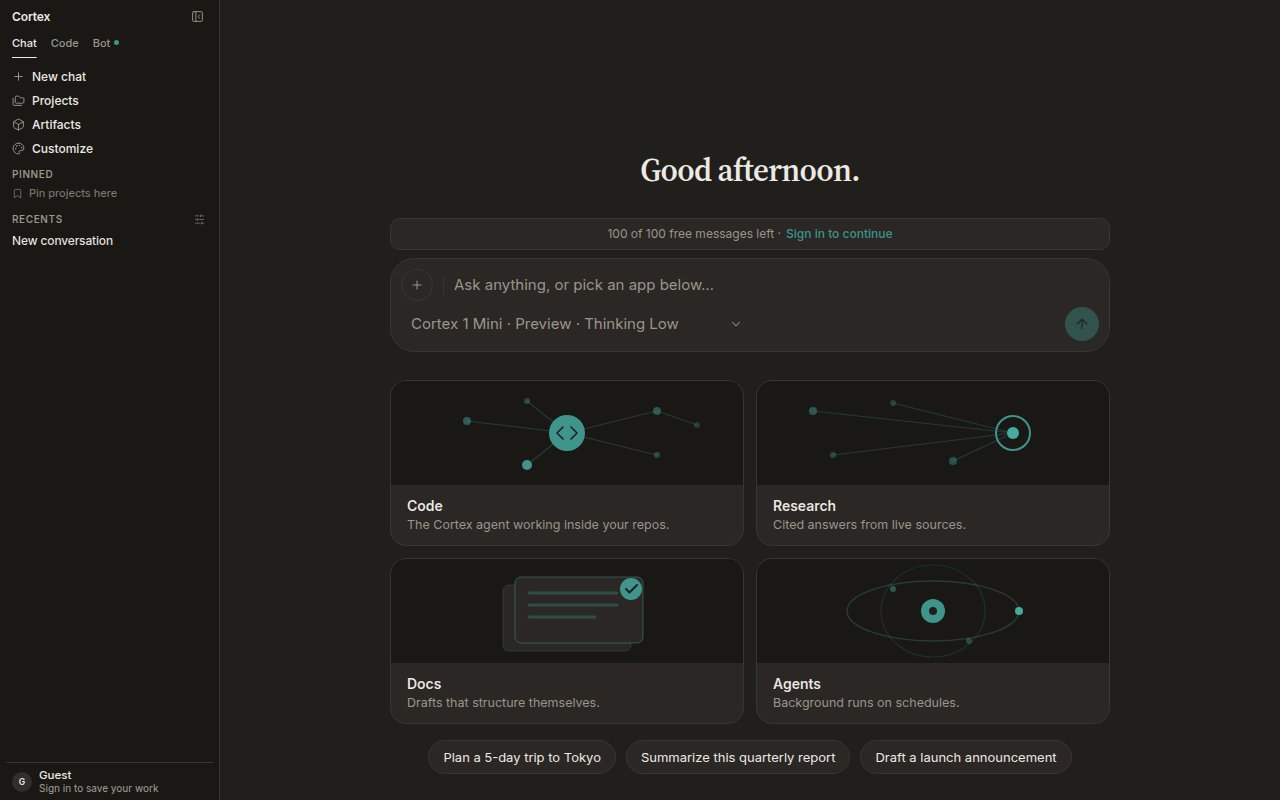
Cortex Chat is the conversation product at [cortex.foundation](https://cortex.foundation). Ask questions, write, research with citations, work with documents and images, and keep related work together in projects. Chat works before you sign in; projects, files, memory, plans, and connections belong to a signed-in account.
 ## Start here
First message, attach a file, pick a model, keep the thread in a project.
What Chat is for, what lives where in the sidebar, and when to switch to Code or Bot.
Guest allowance versus a signed-in member, and what each can do.
## Core guides
Standing instructions, chats, and files kept together. Every chat in a project starts from its instructions.
Everything you uploaded and everything the assistant produced. Files stay when a chat is deleted.
Turn a long answer into steps you can tick off. Start one from any chat or from Planning.
Cortex 1 Mini, Cortex Teutonic-1, the Thinking level, and what happens at peak hours.
Built-in tools, connected apps, GitHub, and MCP servers — and which product each connection reaches.
Chat is per account. What that means for projects, plans, and threads.
## Research and media
Plan the questions, read live sources, write a cited report.
Cortex-Image-1 from the composer. Quota, not a paywall, on Free and Guest.
Ask whether attached media is authentic. Fails closed when it cannot run.
Dictate with the mic and hear answers with Listen — when the deployment supports them.
## Context that carries over
* [Memory](/chat/memory) — standing preferences and facts, reviewable and deletable one by one.
* [Canvases](/chat/canvases) — a document sidecar beside the conversation, drafted by Cortex or by you.
## Under the hood
* [How Chat works](/chat/how-it-works) — the tool loop, compaction, and Chat's round budget.
* [Streaming](/chat/streaming) — tokens, then tools, then the finished reply; what happens on a dropped connection.
* [Settings](/getting-started/settings) — theme, language, shortcuts, defaults, privacy.
## Start here
First message, attach a file, pick a model, keep the thread in a project.
What Chat is for, what lives where in the sidebar, and when to switch to Code or Bot.
Guest allowance versus a signed-in member, and what each can do.
## Core guides
Standing instructions, chats, and files kept together. Every chat in a project starts from its instructions.
Everything you uploaded and everything the assistant produced. Files stay when a chat is deleted.
Turn a long answer into steps you can tick off. Start one from any chat or from Planning.
Cortex 1 Mini, Cortex Teutonic-1, the Thinking level, and what happens at peak hours.
Built-in tools, connected apps, GitHub, and MCP servers — and which product each connection reaches.
Chat is per account. What that means for projects, plans, and threads.
## Research and media
Plan the questions, read live sources, write a cited report.
Cortex-Image-1 from the composer. Quota, not a paywall, on Free and Guest.
Ask whether attached media is authentic. Fails closed when it cannot run.
Dictate with the mic and hear answers with Listen — when the deployment supports them.
## Context that carries over
* [Memory](/chat/memory) — standing preferences and facts, reviewable and deletable one by one.
* [Canvases](/chat/canvases) — a document sidecar beside the conversation, drafted by Cortex or by you.
## Under the hood
* [How Chat works](/chat/how-it-works) — the tool loop, compaction, and Chat's round budget.
* [Streaming](/chat/streaming) — tokens, then tools, then the finished reply; what happens on a dropped connection.
* [Settings](/getting-started/settings) — theme, language, shortcuts, defaults, privacy.