> ## Documentation Index
> Fetch the complete documentation index at: https://cortex-foundation-add13747-droid-1a2462c9-cor-444-sanitize.mintlify.site/llms.txt
> Use this file to discover all available pages before exploring further.
# Deep Research
> Plan the questions, read live sources, and write a cited report. A Chat feature — not a Code tool and not a Bot skill.
Deep Research turns a conversation into a research run. Instead of one answer, Cortex plans a set of questions, reads live sources for each in parallel, and writes a report with citations. You review the plan before it runs and read the report on the thread when it is done.
 ## Turn it on
Either:
* Open the model chip under the composer and switch on **Deep Research** — *Plan the questions, read live sources and write a cited report.*
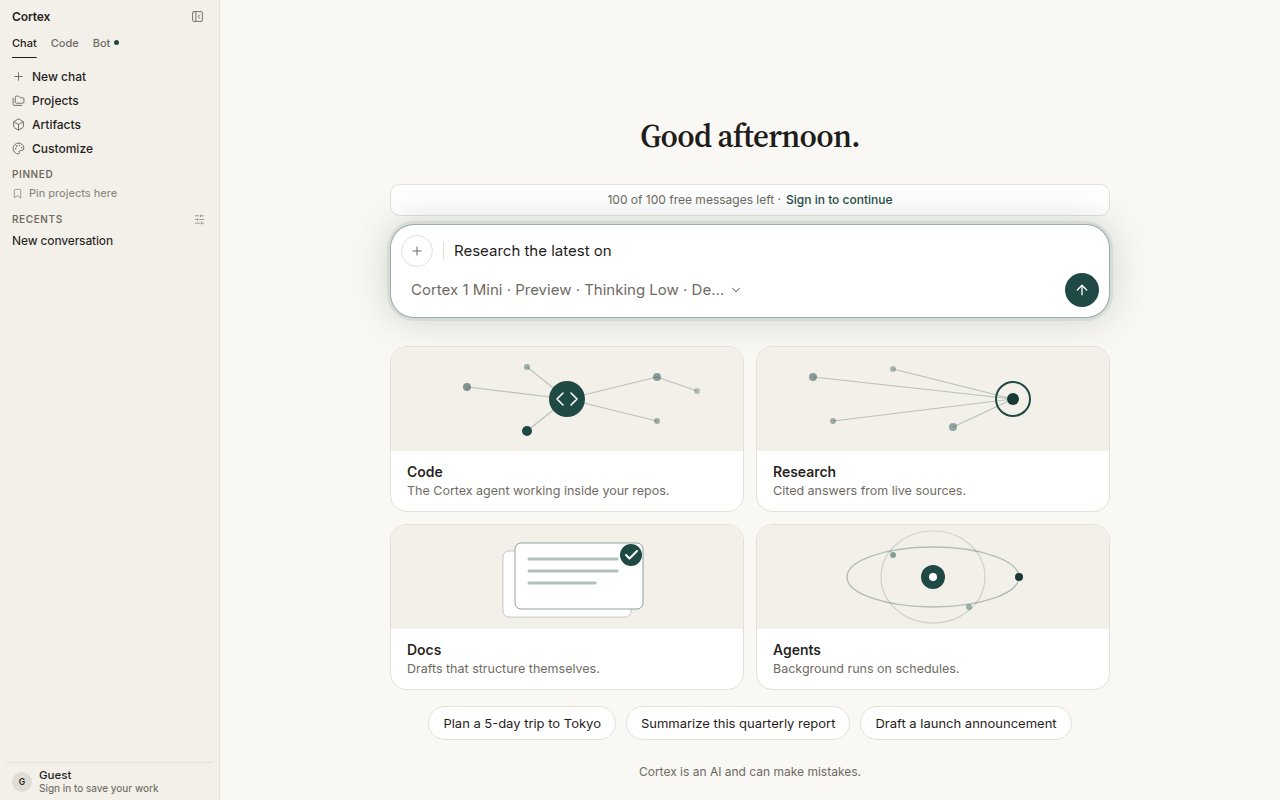
* Choose the **Research** card on Chat home. It prefills *Research the latest on* and enables Deep Research for that conversation.
Then describe what you want to know. The more specific the ask, the sharper the plan.
## The run
Cortex proposes the questions it will answer. The plan appears as a research block on the thread. Review it; a plan that has not been run still offers **Start** when you come back to the thread later.
Choose **Start**. Each question runs as its own background child, in parallel with the others, fetching and reading sources. **Start** disappears once the run has begun.
The report lands on the thread with its citations. Plan and report persist as research blocks, so you can return to them, ask follow-ups, or start a plan from the conversation.
## Limits
| Cap | Limit |
| --------------------- | ----------- |
| Questions per run | 32 |
| Sources per run | 80 |
| Questions in parallel | 8 |
| Fetches per question | 4 |
| Time per question | 180 seconds |
A research run has its own loop and its own limits. It does not inherit Chat's eight-round tool budget, and it does not draw tool-start / tool-end chrome for every fetch.
## Where Deep Research lives
| Surface | Available? |
| ----------- | -------------------------------------------------------------------------------------- |
| Cortex Chat | Yes — the toggle in the model chip |
| Cortex Code | No. Code has web fetch inside a session, not Deep Research. |
| Cortex Bot | No. Bot has `web_search` and `web_fetch` tools, not a research skill. |
| CLI | No. `cortex scrape` fetches a single page; `--search` enables web search in a session. |
## Tips
* Ask for the shape you want back: *a comparison table*, *a timeline*, *a one-page brief with sources*.
* Attach documents to the same thread when your question depends on them; the run can read Library attachments alongside live sources.
* For a quick factual answer, leave Deep Research off — a normal turn with web search is faster.
## Related
* [Models](/chat/models) — the chip where the toggle lives.
* [Plans](/chat/plans) — turn the report into a task list.
* [How Chat works](/chat/how-it-works) — the ordinary tool loop that Deep Research replaces.
## Turn it on
Either:
* Open the model chip under the composer and switch on **Deep Research** — *Plan the questions, read live sources and write a cited report.*
* Choose the **Research** card on Chat home. It prefills *Research the latest on* and enables Deep Research for that conversation.
Then describe what you want to know. The more specific the ask, the sharper the plan.
## The run
Cortex proposes the questions it will answer. The plan appears as a research block on the thread. Review it; a plan that has not been run still offers **Start** when you come back to the thread later.
Choose **Start**. Each question runs as its own background child, in parallel with the others, fetching and reading sources. **Start** disappears once the run has begun.
The report lands on the thread with its citations. Plan and report persist as research blocks, so you can return to them, ask follow-ups, or start a plan from the conversation.
## Limits
| Cap | Limit |
| --------------------- | ----------- |
| Questions per run | 32 |
| Sources per run | 80 |
| Questions in parallel | 8 |
| Fetches per question | 4 |
| Time per question | 180 seconds |
A research run has its own loop and its own limits. It does not inherit Chat's eight-round tool budget, and it does not draw tool-start / tool-end chrome for every fetch.
## Where Deep Research lives
| Surface | Available? |
| ----------- | -------------------------------------------------------------------------------------- |
| Cortex Chat | Yes — the toggle in the model chip |
| Cortex Code | No. Code has web fetch inside a session, not Deep Research. |
| Cortex Bot | No. Bot has `web_search` and `web_fetch` tools, not a research skill. |
| CLI | No. `cortex scrape` fetches a single page; `--search` enables web search in a session. |
## Tips
* Ask for the shape you want back: *a comparison table*, *a timeline*, *a one-page brief with sources*.
* Attach documents to the same thread when your question depends on them; the run can read Library attachments alongside live sources.
* For a quick factual answer, leave Deep Research off — a normal turn with web search is faster.
## Related
* [Models](/chat/models) — the chip where the toggle lives.
* [Plans](/chat/plans) — turn the report into a task list.
* [How Chat works](/chat/how-it-works) — the ordinary tool loop that Deep Research replaces.