> ## Documentation Index
> Fetch the complete documentation index at: https://cortex-foundation-add13747-droid-1a2462c9-cor-444-sanitize.mintlify.site/llms.txt
> Use this file to discover all available pages before exploring further.
# Image generation
> Ask Chat for a picture and Cortex-Image-1 paints it. Generated images land in Library. On Free and Guest, images are a daily quota — not a paywall.
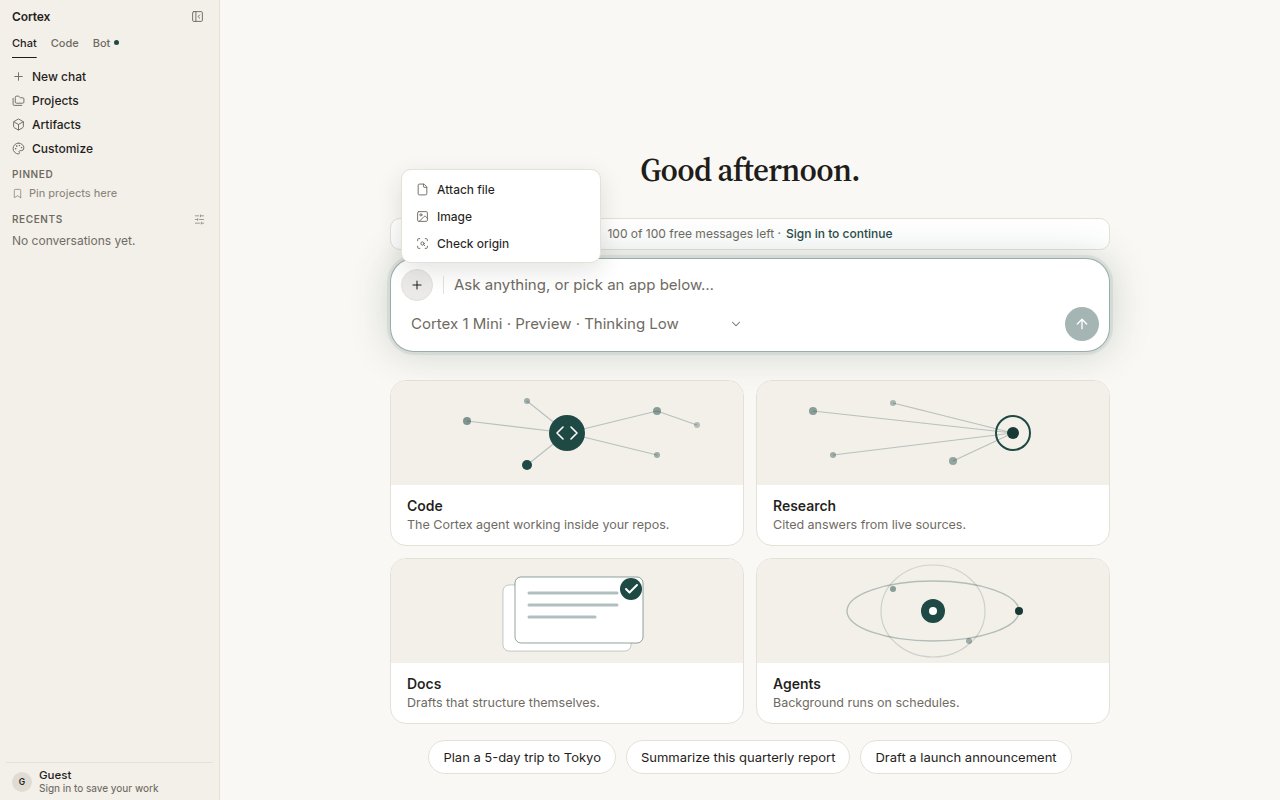
Ask for a picture in plain language, or choose **+ → Image** on the composer. Chat loads its image skill, turns your ask into a complete scene description, and calls **Cortex-Image-1**. The finished picture is a Library file you can reuse in any chat or project.
 ## Ask for a picture
Describe the whole scene — subject, setting, light, style. You can also set:
| Option | Range | Notes |
| --------------- | ------------ | ---------------------------------------------- |
| Size | Preset sizes | Pick from the options offered |
| Seed | Any integer | Same seed, same prompt: a reproducible picture |
| Negative prompt | Free text | What to keep out of the frame |
| Steps | 1–50 | More steps, more detail, more time |
| Guidance | 0–20 | How closely the picture follows the prompt |
## What the card shows
| State | You see |
| ------------ | ---------------------------------------------------------------- |
| `queued` | **Improving prompt…** — Chat is completing the scene description |
| `generating` | A skeleton where the picture will appear |
| `done` | The picture, saved to Library |
| `error` | An error square — never a spinner |
If the Library fetch for a finished picture fails, you see the error square. If image generation is not configured on a deployment, the request fails closed before any quota is spent.
## Quota, not a paywall
On **Free** and **Guest**, image generation is metered as `images_per_day`. Using the window is [`quota_exceeded`](/problems/quota_exceeded): wait for the reset shown under **Settings → Plan & billing**. A plan that does not include image generation at all is [`entitlement_required`](/problems/entitlement_required). Free explicitly lists *Image generation with Cortex-Image-1*. See [Plans](/getting-started/plans).
## About the model
**Cortex-Image-1** is the image model for Cortex Chat, in preview, built on NVIDIA Cosmos. It appears in **Settings → Models** beside the chat models with the attribution *Built on NVIDIA Cosmos*. See [Models](/chat/models).
## Origin check is separate
A generated picture is a Library file like any other. **Check origin** is a different ask — attach media and ask whether it is authentic. It does not run automatically after every generation. See [Origin check](/chat/origin-check).
## Tips
* One complete sentence beats a list of keywords: *A lighthouse on a granite headland at dusk, long exposure, soft teal sky.*
* Reuse the seed to iterate on a picture you like while changing one thing at a time.
* Use the negative prompt for the things the model keeps adding that you do not want.
## Ask for a picture
Describe the whole scene — subject, setting, light, style. You can also set:
| Option | Range | Notes |
| --------------- | ------------ | ---------------------------------------------- |
| Size | Preset sizes | Pick from the options offered |
| Seed | Any integer | Same seed, same prompt: a reproducible picture |
| Negative prompt | Free text | What to keep out of the frame |
| Steps | 1–50 | More steps, more detail, more time |
| Guidance | 0–20 | How closely the picture follows the prompt |
## What the card shows
| State | You see |
| ------------ | ---------------------------------------------------------------- |
| `queued` | **Improving prompt…** — Chat is completing the scene description |
| `generating` | A skeleton where the picture will appear |
| `done` | The picture, saved to Library |
| `error` | An error square — never a spinner |
If the Library fetch for a finished picture fails, you see the error square. If image generation is not configured on a deployment, the request fails closed before any quota is spent.
## Quota, not a paywall
On **Free** and **Guest**, image generation is metered as `images_per_day`. Using the window is [`quota_exceeded`](/problems/quota_exceeded): wait for the reset shown under **Settings → Plan & billing**. A plan that does not include image generation at all is [`entitlement_required`](/problems/entitlement_required). Free explicitly lists *Image generation with Cortex-Image-1*. See [Plans](/getting-started/plans).
## About the model
**Cortex-Image-1** is the image model for Cortex Chat, in preview, built on NVIDIA Cosmos. It appears in **Settings → Models** beside the chat models with the attribution *Built on NVIDIA Cosmos*. See [Models](/chat/models).
## Origin check is separate
A generated picture is a Library file like any other. **Check origin** is a different ask — attach media and ask whether it is authentic. It does not run automatically after every generation. See [Origin check](/chat/origin-check).
## Tips
* One complete sentence beats a list of keywords: *A lighthouse on a granite headland at dusk, long exposure, soft teal sky.*
* Reuse the seed to iterate on a picture you like while changing one thing at a time.
* Use the negative prompt for the things the model keeps adding that you do not want.