> ## Documentation Index
> Fetch the complete documentation index at: https://cortex-foundation-add13747-droid-1a2462c9-cor-444-sanitize.mintlify.site/llms.txt
> Use this file to discover all available pages before exploring further.
# Tools and connectors
> Built-in Chat tools, connected apps under Customize → Connectors, GitHub in Settings → Integrations, and MCP servers — and which product each connection reaches.
A Chat turn can call tools. Some are built in — web search, Python snippets, image generation, memory, canvases. Others come from apps you connect, and from MCP servers you attach. This page explains where each lives and how to scope it.
 ## Built-in tools
| Task | What Chat uses | Guide |
| -------------------------------------------- | ------------------------------ | --------------------------------------------------------- |
| Find current information | Web search and web extraction | [Deep Research](/chat/deep-research) for a full cited run |
| Work through a calculation or transform data | A Python snippet sandbox | [How Chat works](/chat/how-it-works) |
| Create a picture | Cortex-Image-1 | [Image generation](/chat/images) |
| Check attached media | Origin check | [Origin check](/chat/origin-check) |
| Remember a preference across chats | Memory | [Memory](/chat/memory) |
| Draft a document beside the chat | A canvas | [Canvases](/chat/canvases) |
| Read a large attachment | Artifact read and search tools | [Library](/chat/library) |
Chat's Python tool runs a small snippet with no workspace. It is not Code's shell inside a Cloud guest and not Bot's computer.
## Connected apps
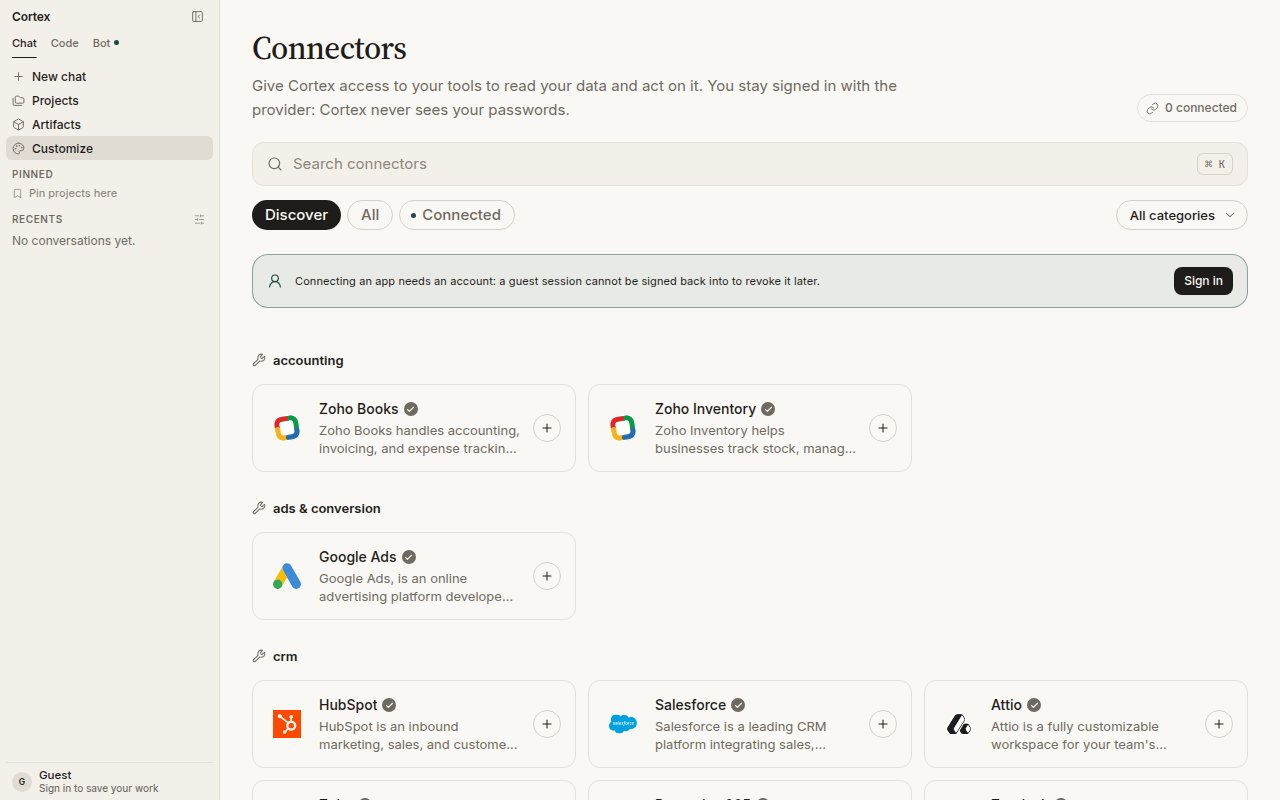
Open **Customize** in the sidebar (the page is titled **Connectors**). Apps are grouped by category — accounting, ads, CRM, and so on — with **Discover**, **All**, and **Connected** filters and a search box (⌘ K).
Connecting an app needs an account: a guest session cannot be signed back into to revoke the connection later.
Choose the app and follow its own sign-in. You stay signed in with the provider; Cortex never sees your passwords.
Each connection can be available to **Cortex Chat**, **Cortex Bot**, or both. A connection enabled only for Bot is not a Chat tool, and Bot never inherits a tool you did not assign to it.
Connected apps are read at question time. Their content is never stored by Cortex — see [Security](/security/overview).
## Integrations in Settings
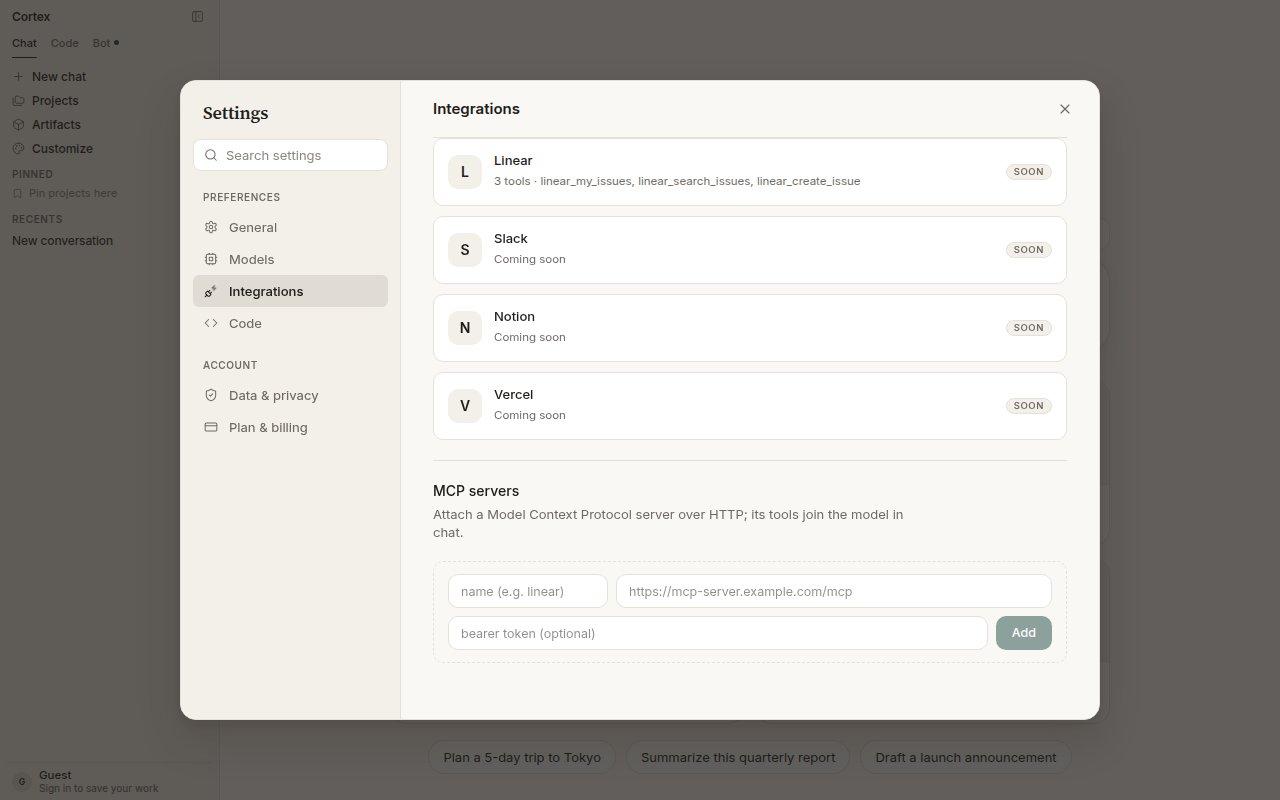
**Settings → Integrations** lists the apps that add tools directly to your conversations. GitHub is live with four tools — list pull requests, list issues, create issue, and more. Linear, Slack, Notion, and Vercel are shown as coming soon. The GitHub connection is the same one Code uses for repositories; see [Connect GitHub](/code/github) for the walk-through.
## MCP servers
Cortex Chat is a Model Context Protocol client. Under **Settings → Integrations → MCP servers**, attach a server over HTTP: a name, its URL, and an optional bearer token. Its tools join the model in chat alongside built-in tools and connected apps. You must be signed in.
## Built-in tools
| Task | What Chat uses | Guide |
| -------------------------------------------- | ------------------------------ | --------------------------------------------------------- |
| Find current information | Web search and web extraction | [Deep Research](/chat/deep-research) for a full cited run |
| Work through a calculation or transform data | A Python snippet sandbox | [How Chat works](/chat/how-it-works) |
| Create a picture | Cortex-Image-1 | [Image generation](/chat/images) |
| Check attached media | Origin check | [Origin check](/chat/origin-check) |
| Remember a preference across chats | Memory | [Memory](/chat/memory) |
| Draft a document beside the chat | A canvas | [Canvases](/chat/canvases) |
| Read a large attachment | Artifact read and search tools | [Library](/chat/library) |
Chat's Python tool runs a small snippet with no workspace. It is not Code's shell inside a Cloud guest and not Bot's computer.
## Connected apps
Open **Customize** in the sidebar (the page is titled **Connectors**). Apps are grouped by category — accounting, ads, CRM, and so on — with **Discover**, **All**, and **Connected** filters and a search box (⌘ K).
Connecting an app needs an account: a guest session cannot be signed back into to revoke the connection later.
Choose the app and follow its own sign-in. You stay signed in with the provider; Cortex never sees your passwords.
Each connection can be available to **Cortex Chat**, **Cortex Bot**, or both. A connection enabled only for Bot is not a Chat tool, and Bot never inherits a tool you did not assign to it.
Connected apps are read at question time. Their content is never stored by Cortex — see [Security](/security/overview).
## Integrations in Settings
**Settings → Integrations** lists the apps that add tools directly to your conversations. GitHub is live with four tools — list pull requests, list issues, create issue, and more. Linear, Slack, Notion, and Vercel are shown as coming soon. The GitHub connection is the same one Code uses for repositories; see [Connect GitHub](/code/github) for the walk-through.
## MCP servers
Cortex Chat is a Model Context Protocol client. Under **Settings → Integrations → MCP servers**, attach a server over HTTP: a name, its URL, and an optional bearer token. Its tools join the model in chat alongside built-in tools and connected apps. You must be signed in.
 | Field | Notes |
| ---------------- | ---------------------------------------------------------------------------- |
| **Name** | How the server appears in chat, for example `linear` |
| **URL** | The server's HTTP endpoint, for example `https://mcp-server.example.com/mcp` |
| **Bearer token** | Optional. Sent with each request to the server; never shown again. |
The CLI is also an MCP client, with stdio and HTTP transports and its own configuration — see [Extend the CLI](/cli/extend).
## GitHub repositories belong in Code
Connecting GitHub for **Code repositories** is a different control: **Connect GitHub** on Code Home, in the repository picker, or under **Settings → Integrations**. There is no personal-access-token field. If the connection lapses the product shows **Reconnect**; if GitHub is unavailable on your deployment, the control is not shown. See [Connect GitHub](/code/github).
Cortex Security's GitHub App — pull-request review — is a third, separate install. See [Cortex Security](/code/security).
## Frequently asked
You are a guest. The banner on the Connectors page explains it: connecting an app needs an account so the connection can be revoked later.
Connections are scoped per product. Open **Customize → Connectors** and enable it for Chat as well.
No. Connected-app content is read at question time and discarded. See [Security](/security/overview).
| Field | Notes |
| ---------------- | ---------------------------------------------------------------------------- |
| **Name** | How the server appears in chat, for example `linear` |
| **URL** | The server's HTTP endpoint, for example `https://mcp-server.example.com/mcp` |
| **Bearer token** | Optional. Sent with each request to the server; never shown again. |
The CLI is also an MCP client, with stdio and HTTP transports and its own configuration — see [Extend the CLI](/cli/extend).
## GitHub repositories belong in Code
Connecting GitHub for **Code repositories** is a different control: **Connect GitHub** on Code Home, in the repository picker, or under **Settings → Integrations**. There is no personal-access-token field. If the connection lapses the product shows **Reconnect**; if GitHub is unavailable on your deployment, the control is not shown. See [Connect GitHub](/code/github).
Cortex Security's GitHub App — pull-request review — is a third, separate install. See [Cortex Security](/code/security).
## Frequently asked
You are a guest. The banner on the Connectors page explains it: connecting an app needs an account so the connection can be revoked later.
Connections are scoped per product. Open **Customize → Connectors** and enable it for Chat as well.
No. Connected-app content is read at question time and discarded. See [Security](/security/overview).