> ## Documentation Index
> Fetch the complete documentation index at: https://cortex-foundation-add13747-droid-1a2462c9-cor-444-sanitize.mintlify.site/llms.txt
> Use this file to discover all available pages before exploring further.
# Downloads
> Every way to run Cortex — the web app, the Cortex desktop app for Chat and Code, the Bot desktop app, the Design desktop app, and the CLI.
Cortex runs in the browser without installing anything. Download an app when you need a host the browser cannot offer: **This PC** and **SSH** for Code, a desktop home for your bots, or the Design working UI.
## What to install
| You want to… | Install | Guide |
| -------------------------------------------------------------------- | ------------------------------------------------------------ | ----------------------------------------- |
| Chat, run Code in the Cloud, drive a Bot in the Cloud | Nothing — use [cortex.foundation](https://cortex.foundation) | [Quickstart](/getting-started/quickstart) |
| Run Code sessions on **This PC** or over **SSH** | The **Cortex desktop app** (Chat + Code) | [Desktop app](/getting-started/desktop) |
| Drive Code from a terminal, scripts, or CI | The **Cortex CLI** | [Install the CLI](/cli/install) |
| Run bots from a desktop app built for agents, routines, and channels | The **Cortex Bot desktop app** | [Bot desktop](/bot/desktop) |
| Edit Design canvases | The **Cortex Design desktop app** | [Design desktop](/design/desktop) |
## Desktop apps
Desktop builds are published at [releases.cortex.foundation](https://releases.cortex.foundation). Install the build for your platform, open it, and sign in when the app asks — it is the same account as the web app.
There are two desktop apps because the two jobs are different:
| App | Sidebar | Adds |
| ---------------------- | ---------------------------------------------------- | ----------------------------------------------------------------- |
| **Cortex desktop** | Chat and Code | This PC and SSH hosts for Code sessions; the same Chat as the web |
| **Cortex Bot desktop** | Agents, routines, channels — no Chat or Code sidebar | A desktop home for your bots |
Design's working UI is a third, separate desktop app; Chat and Code can still host a canvas that you then open there.
Open releases.cortex.foundation
What desktop adds
## The CLI
The CLI is one binary, `cortex`, installed from [software.cortex.foundation](https://software.cortex.foundation). The installer verifies a SHA-256 checksum before it writes anything.
```bash macOS and Linux theme={null}
curl -fsSL https://software.cortex.foundation/install.sh | sh
```
```powershell Windows theme={null}
irm https://software.cortex.foundation/install.ps1 | iex
```
Then:
```bash theme={null}
cortex --version
cortex login
cd ~/code/my-project && cortex
```
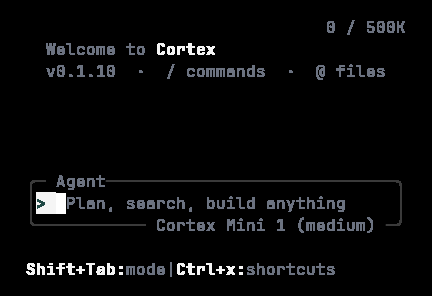 Full steps, version pins, channels, and updates: [Install the CLI](/cli/install).
## Updating
| Surface | How it updates |
| ------------ | ------------------------------------------------------------- |
| Web app | Always current |
| Desktop apps | The updater feed on `releases.cortex.foundation` |
| CLI | `cortex upgrade` (or `cortex upgrade --check` to report only) |
Full steps, version pins, channels, and updates: [Install the CLI](/cli/install).
## Updating
| Surface | How it updates |
| ------------ | ------------------------------------------------------------- |
| Web app | Always current |
| Desktop apps | The updater feed on `releases.cortex.foundation` |
| CLI | `cortex upgrade` (or `cortex upgrade --check` to report only) |