

What each mode may do
Ask and Plan withhold the mutating tools. That is enforced by the harness, not by asking the model to behave: in those modes the edit and shell tools are not offered at all. Plan writes its proposal through a dedicated plan tool. Agent receives the full workspace catalog inside the guest. See How Code works.
When to use which
How to pick
- Choose Ask, Plan, or Agent on the turn. The session row’s setting is the default for new turns.
- Send the task.
- On a follow-up, change mode if you want a tighter or looser loop.
/model picks the model and the reasoning effort, /mode and Shift+Tab switch Agent / Plan / Ask, and /plan drafts a plan before any code is written — see CLI modes and permissions.
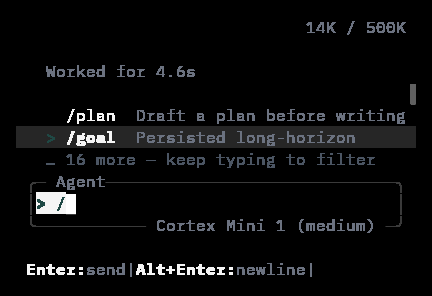
The CLI's slash palette in a small terminal: /plan drafts a plan before writing, /goal keeps a long-horizon objective.
Plan in practice
A Plan turn reads the repository and returns a structured plan: the steps it would take, the files it would touch, the risks it sees. Nothing changes until you send an Agent turn. Ask for adjustments in Plan as many times as you like — the cheap moment to redirect is before any file moves. The CLI adds a Spec lock on top of Plan that keeps mutating tools blocked until you accept the plan; see CLI modes.Related
- Sessions — where the turns live.
- Code quickstart — a first Plan, then Agent.