

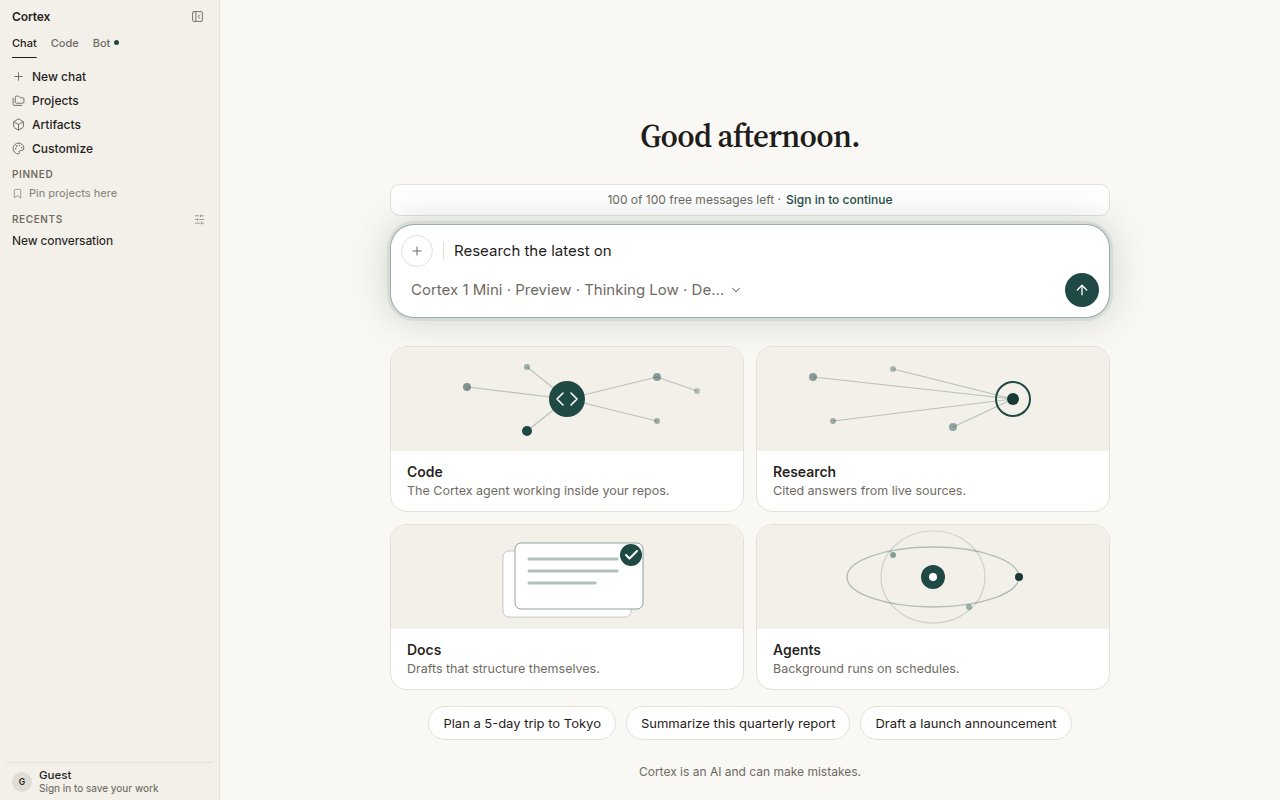
The Research card on Chat home prefills the composer and switches Deep Research on — the chip now ends in “De…” for Deep Research.
Turn it on
Either:- Open the model chip under the composer and switch on Deep Research — Plan the questions, read live sources and write a cited report.
- Choose the Research card on Chat home. It prefills Research the latest on and enables Deep Research for that conversation.
The run
1
Plan
Cortex proposes the questions it will answer. The plan appears as a research block on the thread. Review it; a plan that has not been run still offers Start when you come back to the thread later.
2
Run
Choose Start. Each question runs as its own background child, in parallel with the others, fetching and reading sources. Start disappears once the run has begun.
3
Read the report
The report lands on the thread with its citations. Plan and report persist as research blocks, so you can return to them, ask follow-ups, or start a plan from the conversation.
Limits
A research run has its own loop and its own limits. It does not inherit Chat’s eight-round tool budget, and it does not draw tool-start / tool-end chrome for every fetch.
Where Deep Research lives
Tips
- Ask for the shape you want back: a comparison table, a timeline, a one-page brief with sources.
- Attach documents to the same thread when your question depends on them; the run can read Library attachments alongside live sources.
- For a quick factual answer, leave Deep Research off — a normal turn with web search is faster.
Related
- Models — the chip where the toggle lives.
- Plans — turn the report into a task list.
- How Chat works — the ordinary tool loop that Deep Research replaces.