

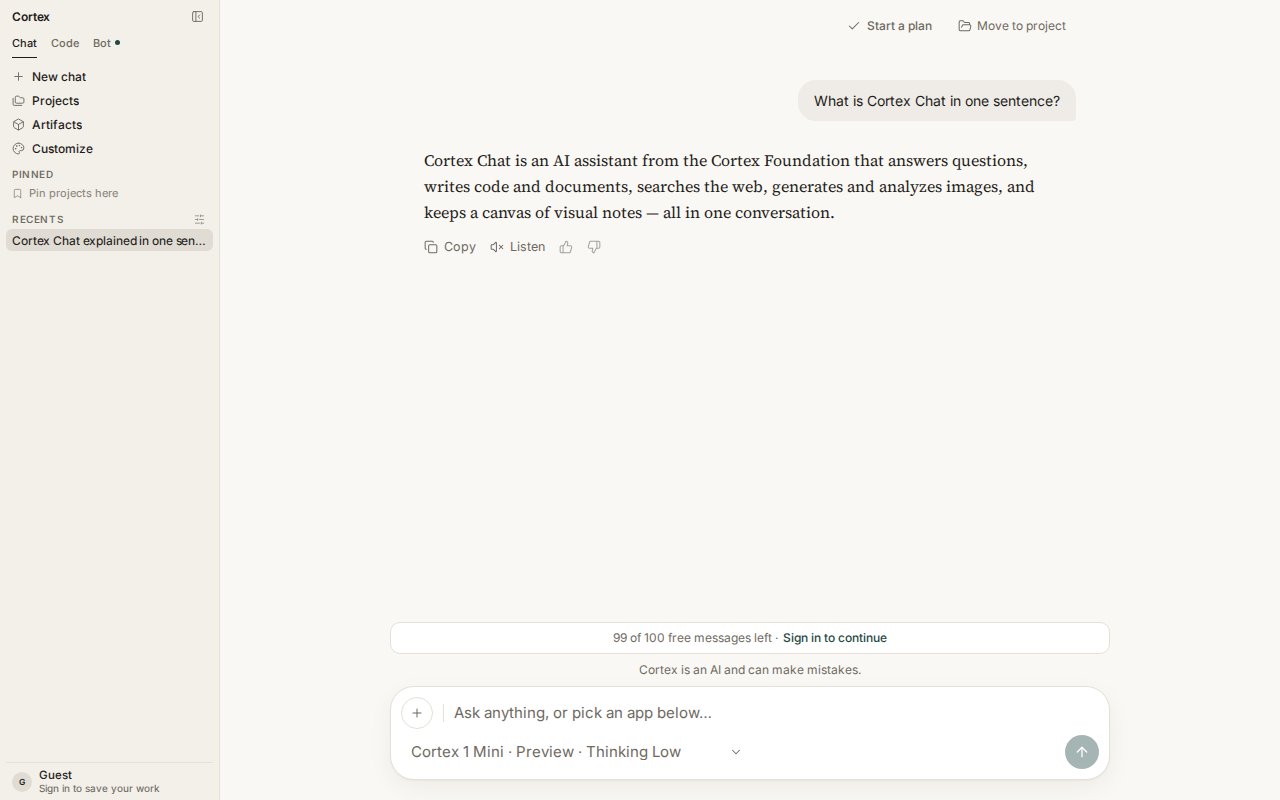
A Chat thread. The reply carries Copy, Listen, and feedback controls; the header offers Start a plan and Move to project.
The sidebar
The composer
- + opens Attach file, Image, and Check origin.
- The model chip (for example Cortex 1 Mini · Preview · Thinking Low) switches model, sets the Thinking level, and toggles Deep Research.
- Enter sends; Shift + Enter adds a line; Esc stops a response.
- While a turn runs, the placeholder reads Cortex is responding… and the send button becomes a stop control.
Home starting points
The four cards on Chat home are shortcuts, not separate products:A thread
Every reply carries Copy, Listen (when voice is available), and thumbs up / down. The thread header offers Start a plan — turn this conversation into a task list — and Move to project. Replies render markdown: headings, tables, and syntax-highlighted code blocks with their own Copy button. A small line under the composer reminds you that Cortex is an AI and can make mistakes.When to switch
Chat does not run Code’s workspace shell or Bot’s computer. Chat’s Python tool is a snippet sandbox with no workspace; it cannot see a repository. How the loop runs: How Chat works.
Next
- Chat quickstart — from open to a useful first conversation.
- Projects · Library · Plans
- Models · Tools and connectors